
New Releasev1.1.0Desktop Application (Windows)

ZHX PDF Renamer

Automatically Rename Hundreds of Tax PDFs in Seconds

Messy filenames from CoreTax downloads driving you crazy? If your daily accounting workflow involves sorting through dozens or hundreds of tax PDFs—e-Faktur, e-Bupot, and tax returns—ZHX PDF Renamer is engineered specifically for that. Simply drag and drop files or folders; the app parses document contents and assigns consistent, standardized filenames automatically.

100% Free via Community ActivationWindows 10 / 11 (64-bit)100% Offline & Private Processing
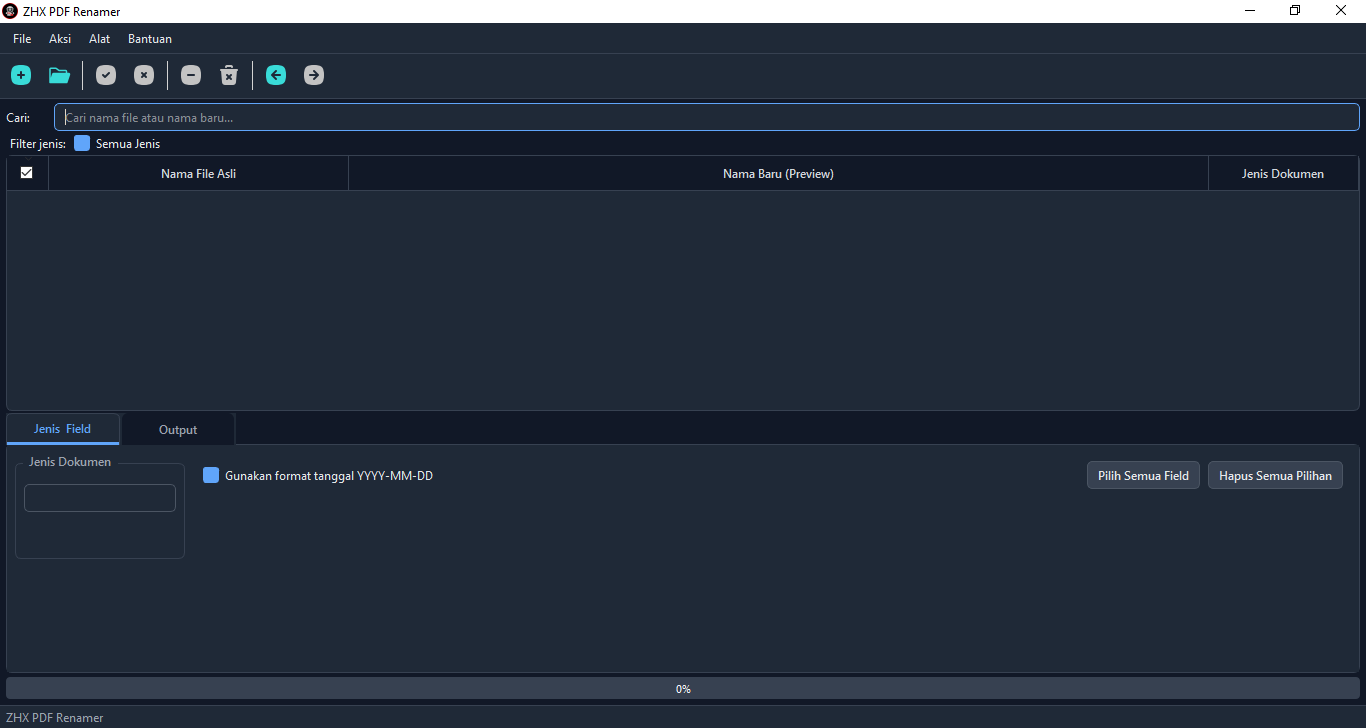
ZHX PDF Renamer desktop main application workspace
CategoryDesktop Software
Latest Versionv1.1.0
Operating SystemWindows 10 / 11 (64-bit)
License100% Free (Community Activation)
Supported FormatsTax & Financial PDFs
Security100% Offline / Local Execution

A Practical Solution for Tax PDF Archiving

End the tedious, error-prone manual routine of renaming tax document files one by one.

For tax professionals, accountants, and finance personnel dealing with dozens or hundreds of PDF files daily from tax portals, manual file management is a tremendous productivity drain. Standardizing document numbers, counterparty names, and tax periods by hand invites fatigue and indexing mistakes.

ZHX PDF Renamer extracts internal metadata and text content directly on your local computer, assigning structured, uniform file names automatically. Beyond smart renaming, the latest release includes essential daily PDF utilities: seamless document merging, precision page splitting, and 2-click metadata export into structured Excel spreadsheets.

New in Version 1.1.0: A major architectural release introducing 3 highly requested productivity tools: PDF Merge, PDF Split, and Export to Excel — all running on background worker threads to keep your PC completely responsive.

Core Features & Productivity Tools

Everything you need to organize, structure, and convert tax documents in one lightweight desktop tool.

Smart Tax Document Auto-Detection

Accurately identifies e-Faktur, e-Bupot withholding slips, Annual/Periodic returns, Electronic Filing Receipts (BPE/BPS), Billing Codes, and official tax correspondence.

Drag & Drop Batch Renaming

Simply drag files or entire directory folders directly into the app window. Hundreds of files are parsed and renamed concurrently with a single mouse click.

Custom Naming Patterns

Configure your naming format to align with office archiving guidelines: arrange document IDs, taxpayer names, tax months, filing years, and custom prefix/suffix tokens.

History & Batch Undo

Selected the wrong naming scheme? Every rename operation is fully logged and can be reverted per-batch at any time to instantly restore original filenames.

PDF Merge & Split Tools

Merge multiple PDF documents into a single consolidated file with custom page ordering, or split files by individual page, every N pages, or custom ranges (e.g. 1-3,5,7-10).

Export Document Recap to Excel

Extract key records from hundreds of documents—such as Tax IDs (NPWP), taxpayer names, document categories, and filing statuses—directly into clean Excel spreadsheets in 2 clicks.

Application Workspace Preview

A clean, functional interface equipped with 5 visual theme presets (including Dark Mode and High-Contrast).

ZHX PDF Renamer primary desktop interface
Primary desktop workspace: drag-and-drop processing queue, pattern builder, and batch execution controls.

Licensing & How to Get a Serial Key

ZHX PDF Renamer is 100% free to use and is not sold commercially.

100% Free

Free Community Activation

This application is built to support the accounting and tax community. Activation is straightforward: subscribe to the ZHX Labs YouTube channel and like the ZHX PDF Renamer video. Send your verification screenshot or comment on the video, and a permanent serial key will be delivered to activate your software.

Specifications & System Requirements

Engineered to run efficiently on standard office PCs without heavy system overhead.

Operating SystemWindows 10, Windows 11 (64-bit)
Processor Architecturex64 / AMD64 (Intel & AMD processors)
Internet ConnectivityOnly during one-time serial activation (Renaming is 100% Offline)
Package Footprint~35 MB (Portable, self-contained executable)

Version History & Changelog

Release history and feature evolution of ZHX PDF Renamer.

Version 1.1.0 (Latest Release)Major Update

Major release — internal architecture completely redesigned for long-term stability, fortified licensing subsystem, and 3 major utility tools added:

  • Added PDF Merge — combine multiple PDF files into one with customizable page sequences.
  • Added PDF Split — split documents per single page, every N pages, or custom ranges.
  • Added Export to Excel — automatic extraction of Tax IDs, taxpayer names, and filing types into spreadsheets.
  • Improved Worker routines execute in background threads to maintain high desktop responsiveness.
Version 1.0.0Initial Release
  • Feature Automated document detection for e-Faktur, e-Bupot, tax returns, and filing receipts.
  • Feature Batch renaming with file and folder drag-and-drop support.
  • Feature Custom pattern configuration, execution history, batch undo, and 5 desktop theme presets.

Document Security & Data Privacy Standards

Your financial records and tax data are guaranteed absolute local confidentiality.

100% Local Execution: PDF files are parsed strictly in your local PC memory
Zero Data Transmission: No files, Tax IDs, or client names are sent to external servers
Safe & Non-Destructive: Batch Undo ensures original file names are easily restored

Start Automating Your Tax PDF Organization

Stop manual file renaming today. Download ZHX PDF Renamer for Windows and streamline your document workflow in seconds.

💬 Discussion & Comments

Waline