
ZHX Image Grabber
Scan & Download All Images from Any Web Page in One Click
A lightweight browser extension to scan and bulk-download every image from any webpage. Features automated auto-scrolling to trigger lazy-loaded assets, infinite scroll feeds, CSS background images, and high-resolution canvas elements — executed 100% locally in your browser.
What is ZHX Image Grabber?
A fast, efficient solution to collect web visual assets without tedious manual right-clicking.
Ever wanted to save multiple images from a single web page — an e-commerce product catalog, image search results, a portfolio showcase, or a blog post — only to find yourself right-clicking and selecting "Save Image As" one by one? ZHX Image Grabber eliminates this repetitive routine in seconds.
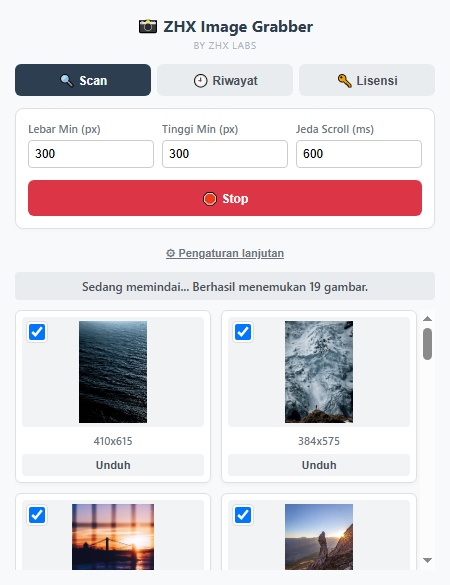
Simply click the extension icon in your browser toolbar: the active page is automatically scanned, and all detected images are neatly displayed in a visual grid ready for individual download or bulk export as a single compressed ZIP archive. The entire scan and download sequence happens entirely on your local machine without passing through external servers.
Core Features & Scanning Capabilities
Intelligent extraction tools engineered to capture every visual asset on modern dynamic websites.
Auto-Scroll & Lazy-Load Support
The extension automatically scrolls the page to trigger lazy-loaded images on infinite-scroll feeds (marketplaces, social networks, long galleries), capturing every asset rather than just the initial viewport.
Comprehensive Detection
Detects standard <img> tags, custom data-src variations, the highest resolution source from srcset/<picture>, CSS background images, and HTML5 <canvas> elements.
Dimension & Ratio Filtering
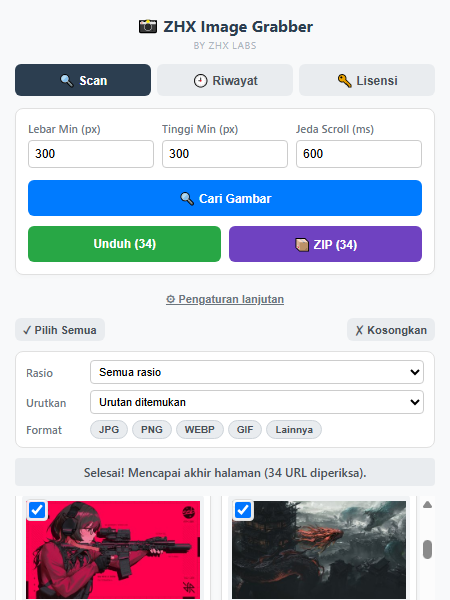
Set minimum width/height thresholds to ignore tiny icons and decorative UI graphics. Filter results further by aspect ratio (landscape, portrait, square) and file extensions (JPG, PNG, WEBP, GIF).
Single or Bulk ZIP Download
Select specific images using checkboxes on each preview card, then download files individually to your Downloads folder or bundle everything into a single compressed ZIP archive.
Custom Renaming & Domain Blocklist
Set custom filename patterns with dynamic placeholders (domain name, page title, alt text). Exclude ad or tracking domains to prevent unwanted images from showing up in scan results.
Scan History & Per-Site Presets
Review prior scan sessions at any time complete with thumbnails in the History tab. Filter thresholds and scroll delays are automatically remembered per domain for future visits.
Workflow Interface Previews
Screenshots showcasing real-time auto-scroll scanning and the completed grid download view.
Browser Compatibility Matrix
Constructed under modern Manifest V3 standards for smooth cross-browser operation.
| Web Browser | Support Status | Extension Standard | Technical Notes |
|---|---|---|---|
| Google Chrome | ✅ Fully Supported | Manifest V3 | Full integration with automated scrolling routines and client-side ZIP packaging. |
| Microsoft Edge | ✅ Fully Supported | Manifest V3 | Seamless execution across Chromium engine with full support for modern image codecs. |
| Mozilla Firefox | ✅ Supported | WebExtensions | Supports comprehensive DOM scanning, custom filtering, and browser action download handling. |
Licensing & Usage Terms
ZHX Image Grabber is free to use with transparent access tiers:
Free Clean Trial
Upon first installation, you immediately receive a free trial period. All downloaded images are clean with no watermark, requiring no registration, account creation, or payment details.
Permanent Free Tier
After the initial trial concludes, the extension remains completely free to use. Downloaded images will include a subtle corner watermark. All core functionality — scanning, filtering, ZIP export, and history — remains 100% active.
Community Promo Program (No Watermarks)
Want to remove watermarks? Join the official ZHX Labs community promo program. Simply submit your promo participation link or community handle via the License tab in the extension. Watermark-free access is immediately enabled during review and becomes permanent once verified.
Security & Data Privacy Standards
Your browsing privacy and local data integrity are our fundamental technical priorities.
Ready to Download Web Images in Seconds?
Stop saving images one by one. Install ZHX Image Grabber and streamline your media collection workflow instantly.