
Ever wanted to save a bunch of images from a single page — a product gallery, search results, a design portfolio, or the photos in a blog post — but ended up right-clicking and "Save As" one at a time? And if the page uses lazy-loading or infinite scroll, images that never fully appeared on screen often don't get saved at all.
This article shows you how to download every image from a website at once — including lazy-loaded ones, CSS background images, and images on long scrolling pages — using the ZHX Image Grabber browser extension.
Why Downloading Images Manually Is a Pain
Right-click → Save As works fine for one or two images. But once you're dealing with dozens, it gets painfully slow. On top of that, many modern sites load images lazily: an image is only fully loaded once you scroll near it, which means anything not yet visible on screen can't be right-clicked at all.
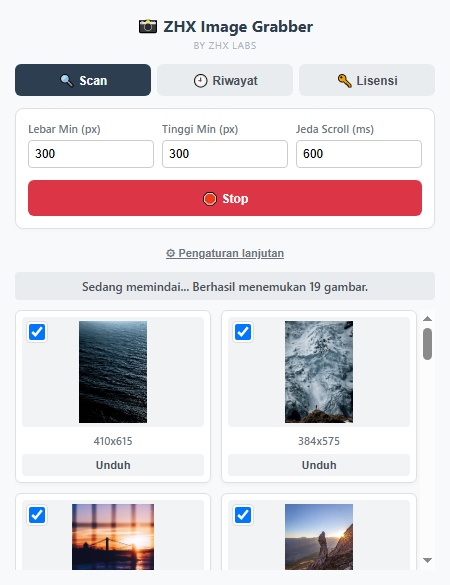
ZHX Image Grabber solves both problems at once: it scans the entire page automatically (scrolling to trigger lazy-loaded content), then presents every image it finds in one place, ready to download individually or in bulk.
Key Features of ZHX Image Grabber
- Automatic scanning with auto-scroll — triggers lazy-loading, so infinite-scroll images get detected too.
- Thorough detection — regular
<img>, lazy-loaded (data-src), highest-resolutionsrcset/<picture>, CSS background images, even<canvas>. - Size & ratio filters — minimum width/height, aspect ratio (landscape/portrait/square), and file format (JPG/PNG/WEBP/GIF).
- Download individually or as a ZIP — check the images you want, then download them one by one or all at once.
- Custom file naming templates — placeholders for domain, page title, dimensions, alt text, and date.
- Excluded domains list — block specific ad/tracker domains.
- Per-site filter presets — settings remembered automatically per domain.
- Scan history — revisit previous scan results anytime, with thumbnails.
- Dark mode & bilingual UI — Indonesian and English.
How to Download All Images from a Website
- Open the target webpage
Open the page whose images you want to download.
- Click the ZHX Image Grabber icon
Open the extension panel in the toolbar.
- Set a minimum width/height filter
Default 300×300 px, then click "Find Images".
- Wait for the scan to finish
The extension auto-scrolls to trigger and capture lazy-loaded images.
- Select the images you want
Or leave everything checked to grab them all.
- Click "Download" or "ZIP"
Save individually, or all at once as a single ZIP file.
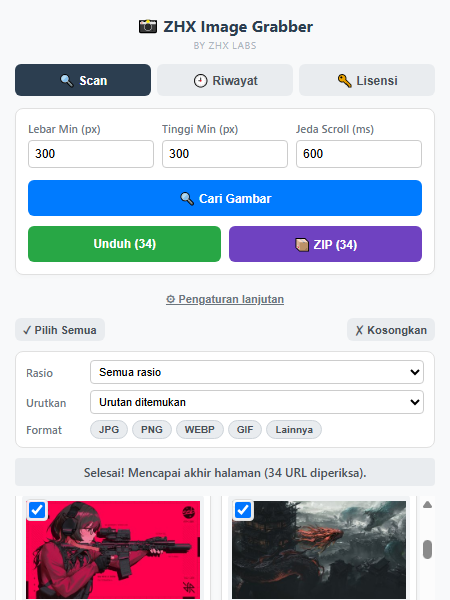
Take advantage of per-site filter presets for domains you visit often — your minimum width/height and scroll delay are remembered automatically.
Privacy: Where Do Your Downloaded Images Go?
Images you scan and download are never sent to or stored on our servers — everything happens locally in your browser. The only data connected to our servers is a random, anonymous installation ID used to check license status, and even that only happens if you open the License tab.
Availability & Compatibility
ZHX Image Grabber is built on Manifest V3 and works across Chromium-based browsers such as Google Chrome and Microsoft Edge, as well as Mozilla Firefox.
Install ZHX Image Grabber now and scan, select, and download every image you need in just a few seconds.
